


F.8.4.5 LOA Finance or LOA PM: Review and Approve

Description
This step generates notices to the appropriate members for Authorization
(Approved or Cancel)
based on the dollar amount of the Change Order. If approved the Change
Order goes to the Contract Administrator
in Change Order Generation state.
 A
finance representative will always authorize in this step. A Project Manager
will authorize if the Project Manager in the prior step doesn’t
have authority otherwise it will skip based on the WDI signature
matrix. A
finance representative will always authorize in this step. A Project Manager
will authorize if the Project Manager in the prior step doesn’t
have authority otherwise it will skip based on the WDI signature
matrix.
|
Outcomes
Once a Change Order is submitted
by the Other Signee(s) it moves to
the Contract Administrator
in the Change Order Generation state.
Detailed Steps
Step 1: .
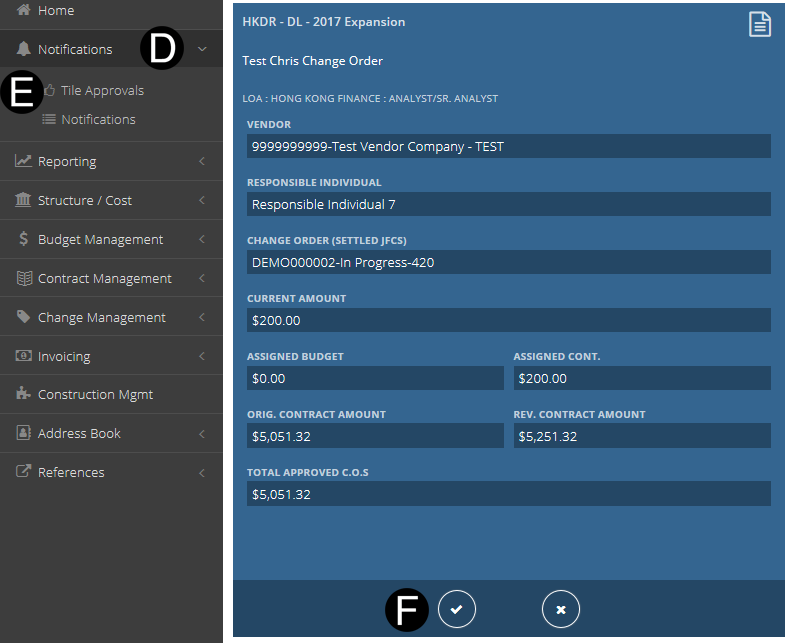
Click Notifications.
Click Tile approvals.
Click  from Notification Tile to
workflow.
from Notification Tile to
workflow.

Step 2: Approve the Contract.
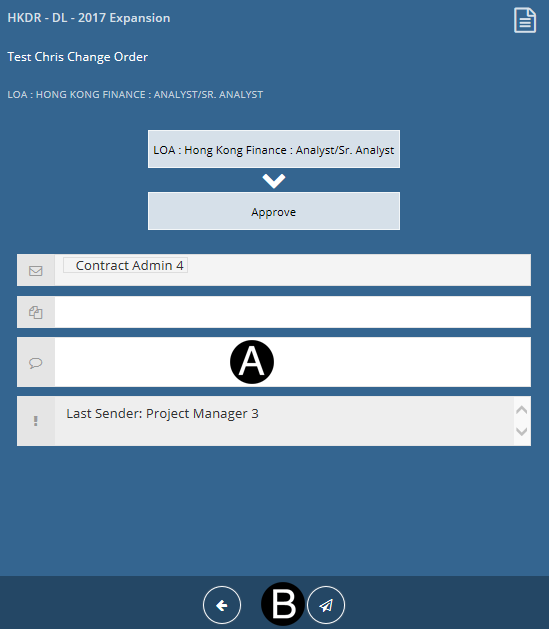
- Type a message in the Message field to include in the Email
notification (optional).
- Click
 to Workflow: Approve.
During
PM Review if Project Manager had LOA permission level it will
skip this LOA-Project Manager State and workflow to Change Order
Generation to the Contract Administrator. |

