 Multiple Contingency Codes can be selected
per line items. Multi Sub-Projects will not have a contingency
default set. Multiple Contingency Codes can be selected
per line items. Multi Sub-Projects will not have a contingency
default set.
The
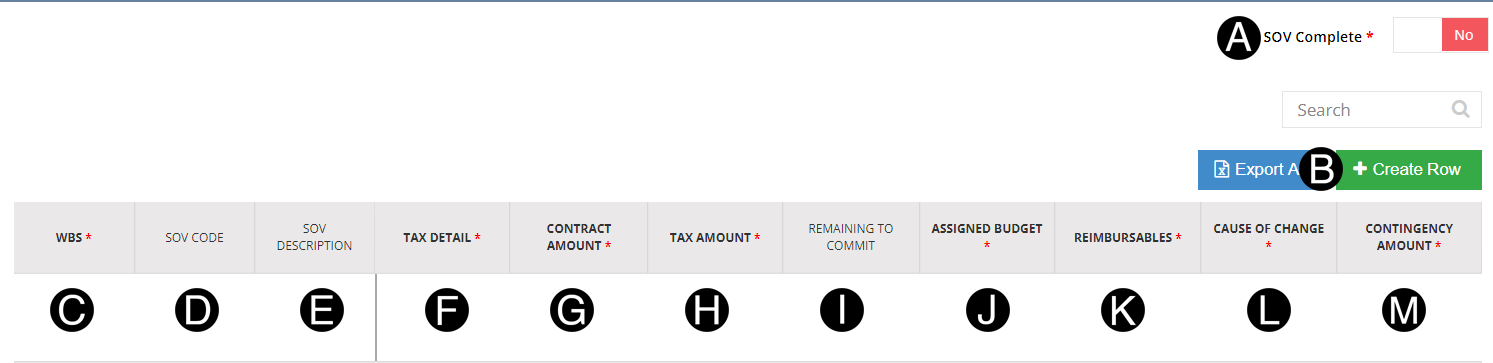
sum of the line items must equal the contract fee, reimbursable
and assigned Budget Total
values entered in the Sub-Project Financial Details by the Contract
Administrator.
Where the same WBS is
used in more than one line item a SOV
Code and SOV Description
is required and must be unique.
Examples
If
all budget is assigned the Cause
of Change will default to N.1.A.13, but other Planned Work
options are available.
Only
WBS that have not been associated to another Contract or PWA will
be available in the WBS Drop Down. If
a document is canceled the WBS will become available.
If
the Net Payment Terms
field enables retention, all line items will default to yes except
those defined as Reimbursable line items. The retention
column can be toggled to NO
for those line items retention is not applicable. |







 .
.


 Tax
Amount is not available for Hong Kong Contracts or Nontaxable
Tax Disposition.
Tax
Amount is not available for Hong Kong Contracts or Nontaxable
Tax Disposition.