





Project Estimator will use input from Contract Administrator, Responsible Individual and the Vendor to determine the Schedule of Value (SOV). The Schedule of Values defines the payment schedule on the Invoice which contains WBS/CBS, Funding type, Labor and Reimbursable and also type and cause of change.


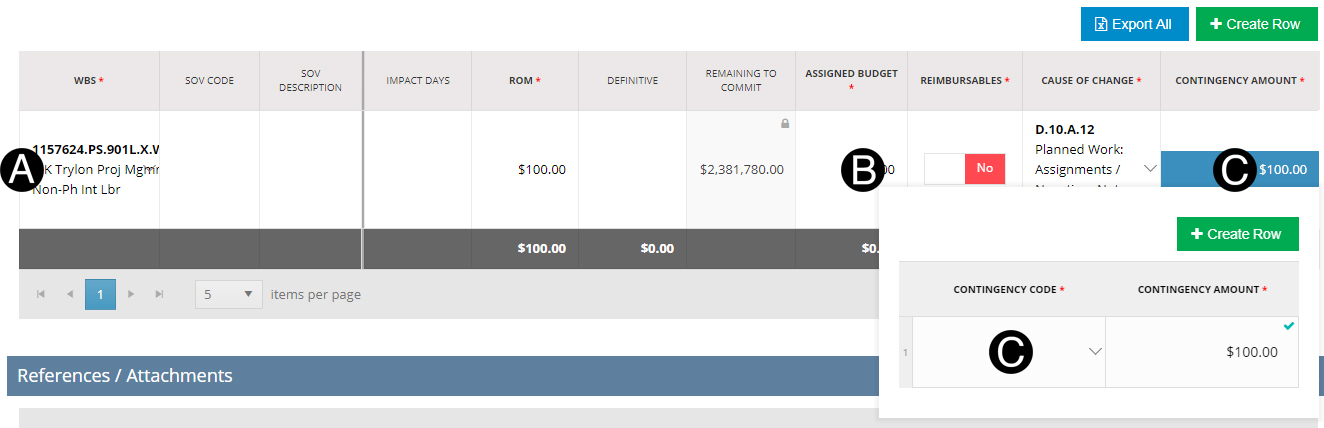
Review/Verify all SOV lines.
Enter the Assigned Budget.
Confirm/Enter Contingency Amount and or Contingency Code.
|

Select Approver.
Select Date.
Attach Approval Attachment document.
|


Click Workflow.
Select Set to PM Review.
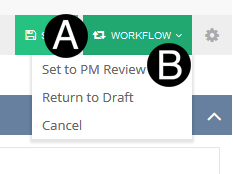
Cancel: will end process and require starting over a new JFC by the Responsible Individual. |
|
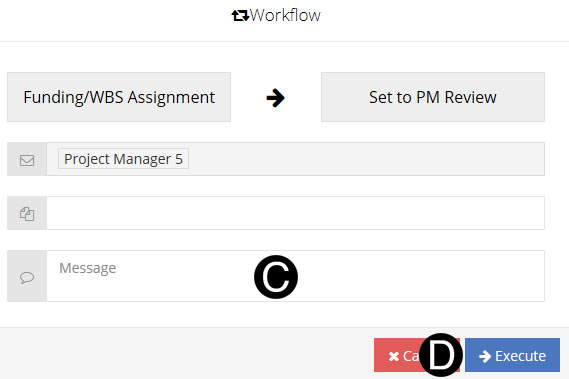
Type a message in the Message field to include in the Email notification (optional).
Click Execute.
 If the same WBS/CBS is used on multiple
rows on the SOV the SOV Code and SOV Descriptions must be unique
per row.
If the same WBS/CBS is used on multiple
rows on the SOV the SOV Code and SOV Descriptions must be unique
per row. Make applicable attachments visible to the
vendor in this step as they will carry over to the Contract Directive.
Make applicable attachments visible to the
vendor in this step as they will carry over to the Contract Directive. Return to Draft: will workflow
to Responsible Individual in Draft State.
Return to Draft: will workflow
to Responsible Individual in Draft State.