A.6 Media Funding/WBS Assignment:  Confirm/Modify WBS and Budget


Description

Media Accounting determines the WBS Funding type.


Outcomes

Travel Authorization is Workflowed to Project Manager in PM Review State.


Media Accounting cannot approve their own Travel Authorizations.


Click to see the T&E Policies.


Detailed Steps


Step 1: Log in to NexGEN.


Step 2: Review SAP Coding Information & Expenditures.

  1. Review/Update WBS/Network/Order.

  2. Review/Update Cost Center.

  3. Review/Update GL Account.

  4. Select Cause of Change from list.

  5. Enter Assigned Budget amount.

Multiple Contingency Codes can be selected per line items. Multi Sub-Projects will not have a contingency default set.   


If all budget is assigned the Cause of Change will default to N.1.A.13, but other Planned Work options are available.


Step 3a: Send the Travel Request.

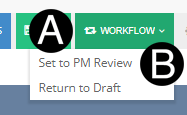
  1. Click Workflow drop-down list.

  2. Click Set to PM Review.

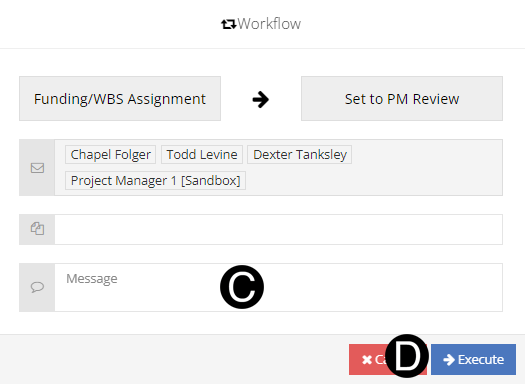
  1. Type a custom message in the Custom Message field (optional).

  2. Click Execute.

OR


Step 3b: Return the Travel Request to Draft.

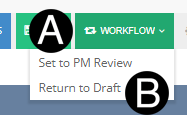
  1. Click Workflow drop-down list.

  2. Click Return to Draft.


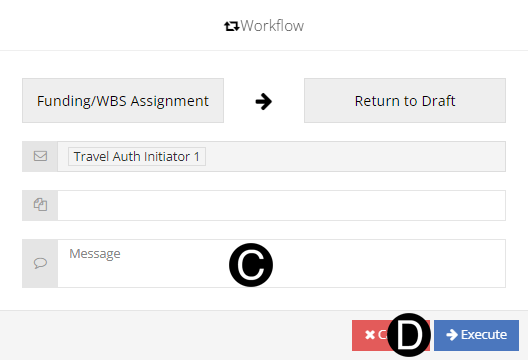
  1. Type a custom message in the Custom Message field (optional).

  2. Click Execute.