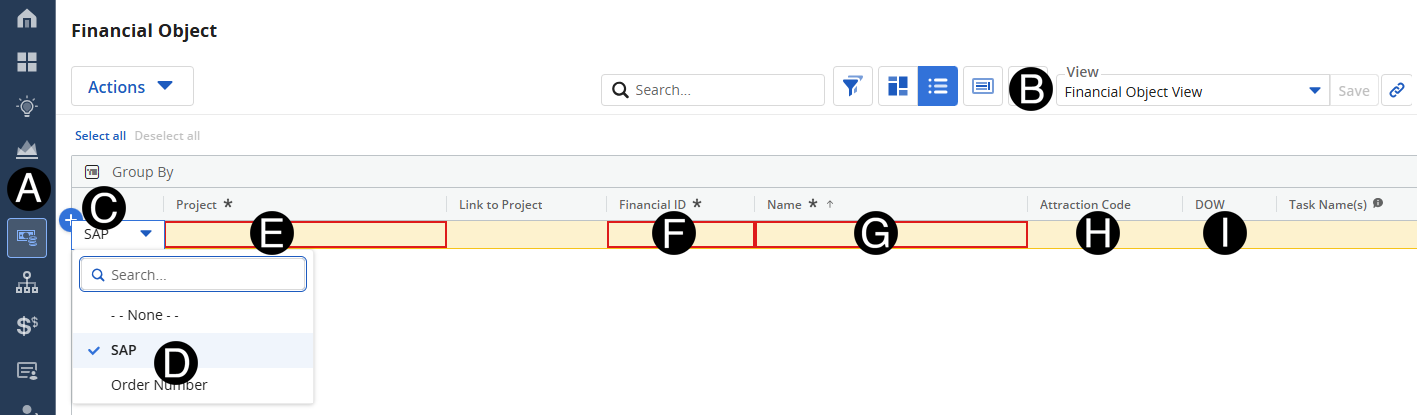
Once a project is created in SAP, Finance will need to complete the Financial Object in Clarity for the WBS (i.e., Tasks) to be created automatically. Those segments are the 7-digit SAP project ID, the Attraction Code, and the Division of Work (DOW) aligned to the sub-project.
 This
7-digit, attraction code and DOW will allow the WBS (i.e., Tasksin
Clarity) to be created automatically by an interface with SAP.
This
7-digit, attraction code and DOW will allow the WBS (i.e., Tasksin
Clarity) to be created automatically by an interface with SAP.
Click on Financial Object icon.
Click Add Row.
Select SAP from drop-down list.
Select Project from drop-down list.
Enter Financial ID (Project ID).
Enter Name.
 Name
should be exactly the same (including format) as the Project Name.
Name
should be exactly the same (including format) as the Project Name.
Enter Attraction Code.
Copy DOW from another project with the same sub-project name (i.e., Ride) for efficiency.