Project grouping is a mechanism for linking the Blue Sky and Capital portions of a project to present a holistic picture of project costs, schedule, and resourcing. This will unlock our ability to compare historical projects.
 Project setup requires
discussion around project properties, hierarchy, and project execution
strategy based on current knowledge but can evolve as the project
progresses.
Project setup requires
discussion around project properties, hierarchy, and project execution
strategy based on current knowledge but can evolve as the project
progresses.
Grouping examples grouping
of Blue Sky and Capital Project as same time. This allow single schedule
to cross both projects and reporting will show full cost of delivery.
Initiative examples
 Depending on project
details and needs, there may not be a grouping for the project.
Depending on project
details and needs, there may not be a grouping for the project.
Placeholder
projects: No Grouping; create only capital projects, and wait until
the Blue Sky project is needed.
Projects
that skip Blue Sky: No grouping
When creating Placeholder
Projects in Clarity, a Project Grouping does not necessarily need
to be made until the corresponding Blue Sky Project is created.
Project Grouping
is only applicable to Menu Projects.
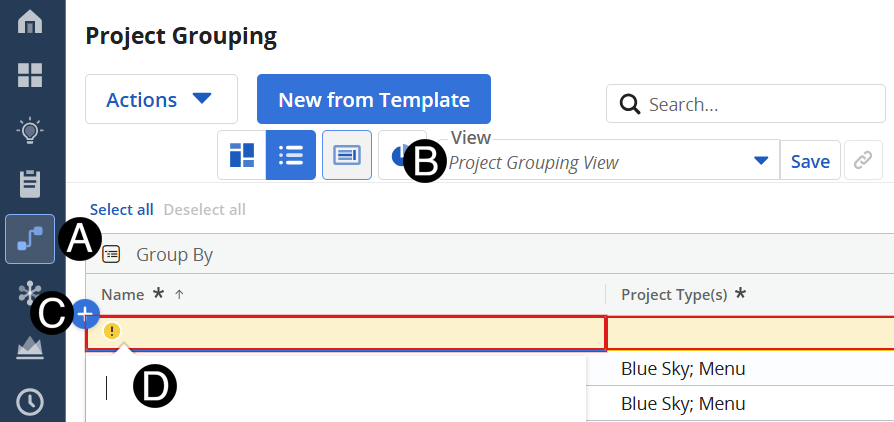
Click Project Grouping icon.
Select Project Grouping View from drop-down list.
Enter in the Project Grouping Name.
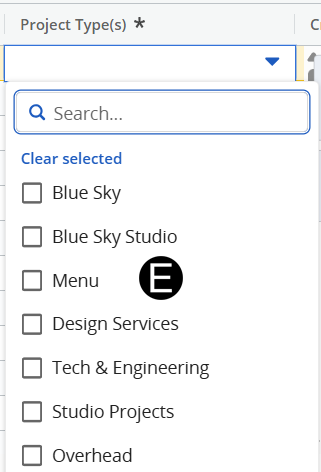
Select appropriate Project Type(s) from drop-down list.
|