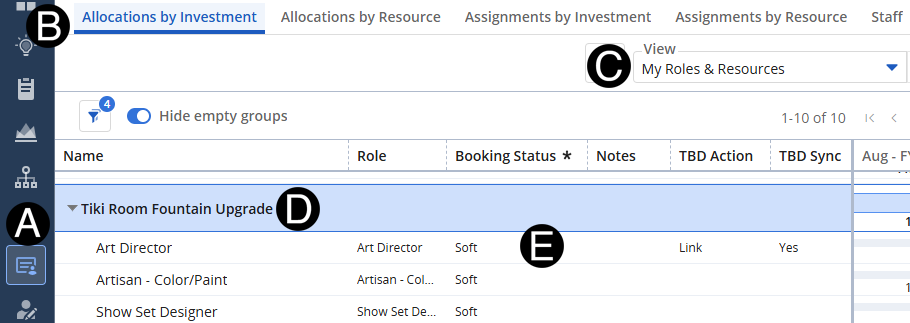
Functional Manager will confirm or update the TBD roles on the project.
Click Staffing Icon.
Click Allocations by Resource tab.
Select My Roles & Resources view.
Expand the Project that you want to confirm TBD to role request.
Review the TBD for Role Request.
 You
can also do this task by using the Allocations
by Investment click here for those steps.
You
can also do this task by using the Allocations
by Investment click here for those steps.
TBD Action should be Link and TBD Sync yes.
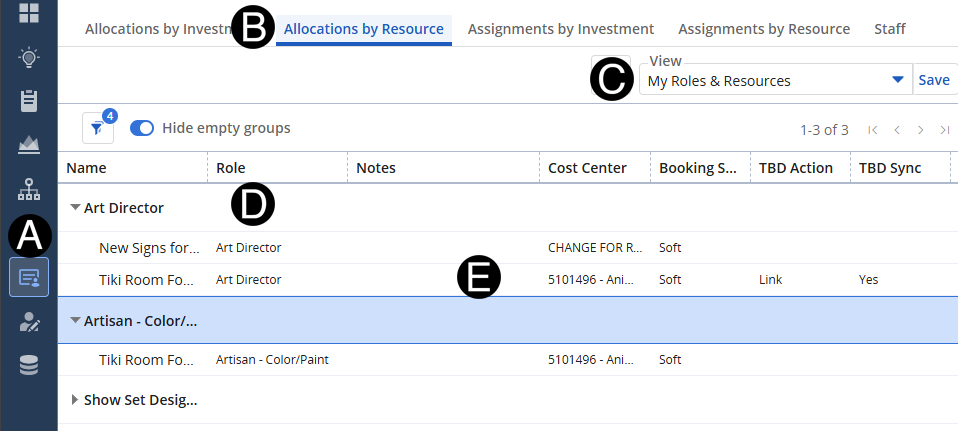
Functional Manager will confirm or update the TBD roles on the project.
Click Staffing Icon.
Click Allocations by Resource tab.
Select My Roles & Resources view.
Expand the Project that you want to confirm TBD to role request.
Review the TBD for Role Request.
You
can also do this task by using the Allocations
by Resource click
here for those steps.
TBD Action should be Link and TBD Sync yes.